Hundreds of screenshots,
sorted batch by batch.
ScreenStack auto-sorts your mountain of screenshots by why you took them, and uses on-device OCR to make codes, orders, and Wi-Fi passwords instantly searchable and copyable. Before anything's deleted, it puts the key details right in front of you — and everything goes to a trash you can recover from. All on-device.
Not just another cleanup app — it stitches tiered backups + a pre-delete receipt + a soft-delete trash into the confidence to actually delete: search a verification code or order number back in a second, and clear the originals from your photo library without a second thought.
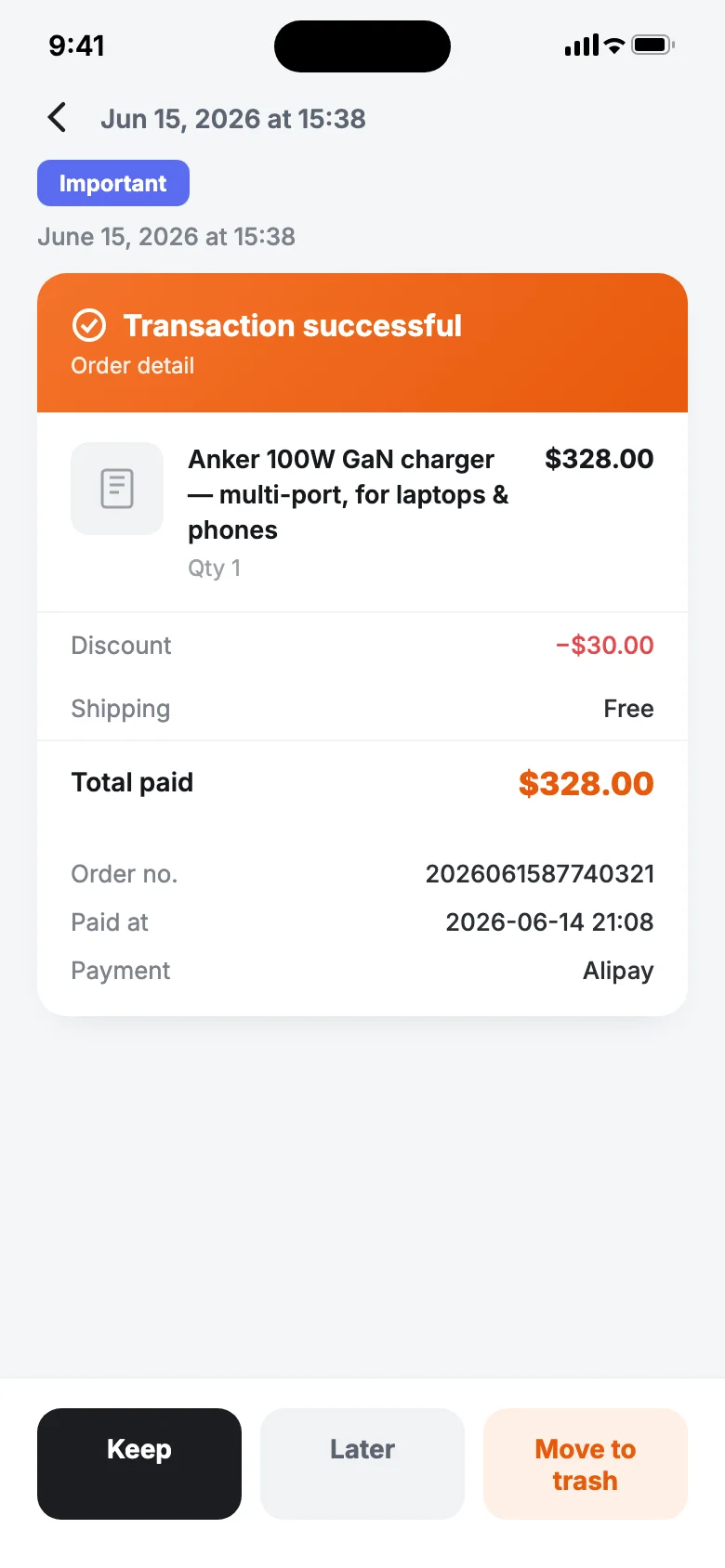
A receipt before anything's deleted
- ✓The key fields sit right above the delete button to verify
- ✓Soft-delete to a recoverable trash — undo anytime
- ✓Credential shots keep an original copy, so you can clear with confidence
A few things it does for you
Sorted batch by batch on import
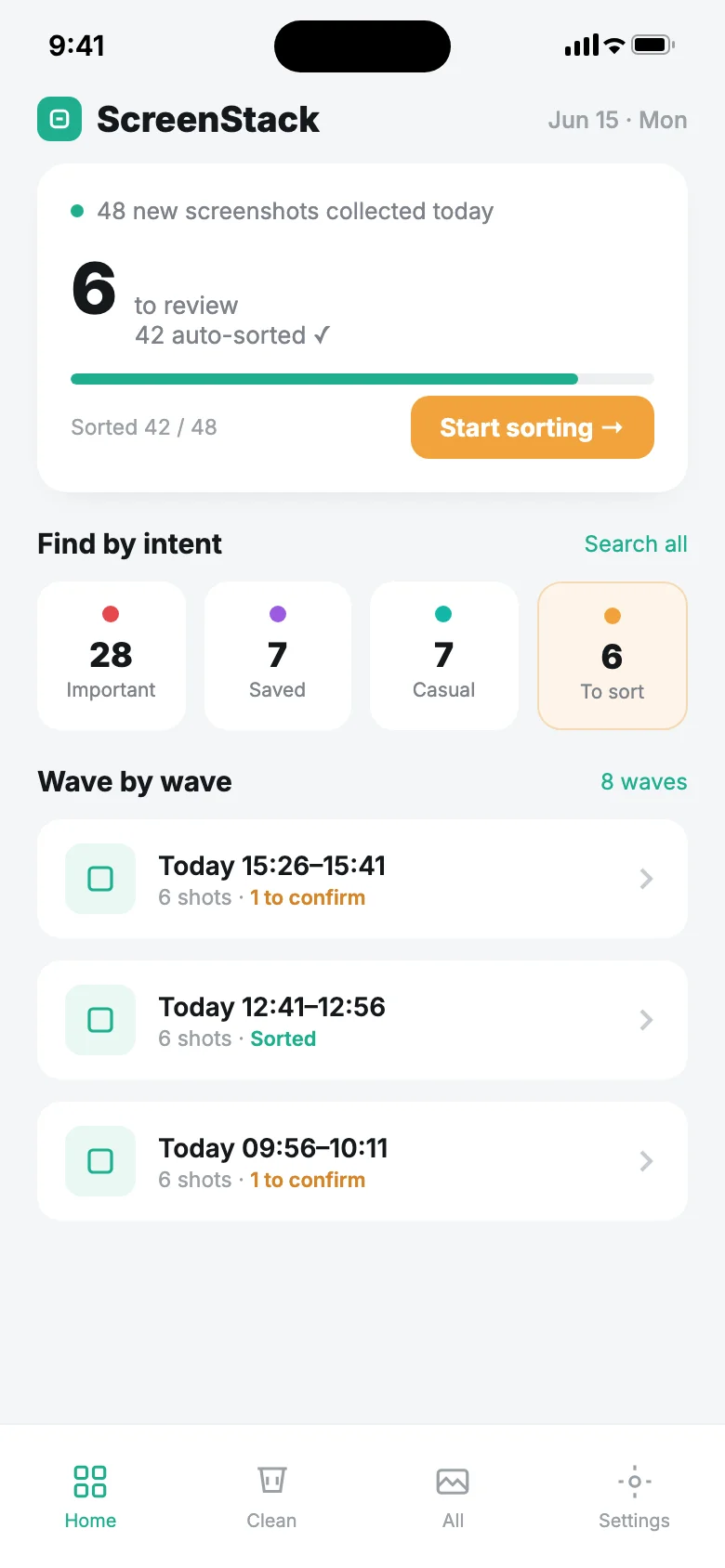
New shots from your system Screenshots album are pulled in automatically, folded into "batch stacks" by 30-minute waves, then filed into four intents — important / saved / casual / to sort. Your home screen is just a dozen stacks to glance over.
Credentials, searchable and copyable
On-device OCR with Apple Vision reads the text in every screenshot, so verification codes, order numbers, Wi-Fi passwords, tracking numbers, and amounts are all searchable — and one tap copies them.
Share straight in from any app
Use the system share sheet in Photos, WeChat, or any app to send a screenshot or photo straight into ScreenStack — no saving to the album first, no manual import.
Free backup, safe across devices
Export an offline backup that keeps original image copies, OCR text, credential fields, notes, tags, and organization state. Restoring verifies the file, then merges non-destructively — nothing is lost when you switch devices or reinstall.
A pre-delete receipt you can trust
Before you delete, a receipt pops up with the key fields it already saved from that shot, laid out right above the delete button so you can double-check on the spot — codes and amounts get an amber heads-up.
Soft-delete trash, so mistakes are reversible
Everything you delete lands in an in-app trash first (recoverable), with a 5-second big-undo toast. Only when you "Delete permanently" yourself does it touch the photo-library original — and that goes through iOS's own second confirmation.
Correct it once, sharper every time
Fix a wrong call once and the app turns it into a human-readable local rule (like "from Amazon → important"), so similar shots sort right from then on. Every rule is visible and editable in settings.
Local-first, optional BYOK AI
OCR, search, and sorting all run on-device — every core feature works with no API key at all. AI enhancement is optional and bring-your-own-key, and your original screenshots are never uploaded.
Smart Cleanup + Credential Wallet, one-time unlock
Import, sorting, search, and basic cleanup are free forever. Pro adds two advanced capabilities on top.
purchase
Smart Cleanup
- ✓Groups screenshots by visual similarity, not just the old text-match dedup
- ✓Flags expired verification codes and temporary credentials as safe to clear
Credential Wallet
- ✓Set expiry reminders on credential screenshots so you don't miss the window
- ✓Batch-export extracted fields to CSV in one tap instead of scrolling to reconcile them by hand
Bring them in, sorted automatically
They come in
Grant photo access and your system Screenshots album imports automatically, running OCR in the background, with old screenshots backfilled too — and you can share any shot straight in from any app's share sheet. No adding them one by one.
You triage
The home screen tells you "N shots left to sort." Tap "Start sorting" and swipe through: left to delete, right to keep, tap to park the ones you're unsure about. Fix a wrong call on the spot and it becomes a rule.
You find it
Search "Wi-Fi," "code," or "order number" in All, and a copy-in-one-tap field card pops up at the top, with the matching screenshots in a grid below.
You clear it
In Cleanup, see suggestions grouped by reason (shared in passing / duplicate / blurry). Check the receipt, send them to trash, and only a permanent delete touches the originals — freeing space right away.
When it earns its keep
Receipts, records, and disputes
Codes, transfers, orders, invoices — you screenshot a pile and then don't dare delete them. Credential screenshots keep an original copy automatically, so when you need one you can search the field back in a second, copy it, or show it full-screen. Delete with confidence, get it back any time.
Clearing the chat-screenshot backlog
The throwaway shots you fired into a group chat and meant to clear right after land on the cleanup radar automatically. Quick triage flies through them a few seconds each, freeing up space — without fear of deleting the wrong one.
Saved guides, how-tos, and ideas
Those long reads, tutorials, and tips you screenshotted come back to life through OCR — search them by what they're for. Related ones group together automatically, so they never sink to the bottom of your camera roll, lost for good.
You might be wondering
Do my screenshots get uploaded to the cloud?
No. OCR, search, and sorting all run locally on your iPhone / Mac, and your original screenshots never leave the device. Only when you turn on AI enhancement and add your own API key does it send the recognized text (never the image) to the platform you choose.
If I delete a photo, can I still get it back?
Credential and saved screenshots keep an original copy inside the app, so anything you send to the trash can be restored anytime. Only when you manually "Delete permanently" from the trash does it actually remove the original from your photo library — and that goes through iOS's own second confirmation.
Can I use it without an AI key?
Yes. Auto-sorting, full-text on-device OCR search, credential extraction, the pre-delete receipt, quick triage — every core feature works without AI. AI is just an optional boost for finer judgment on the screenshots that are genuinely hard to classify.
Is it a pain to fix a wrong sort?
Tap right on the screenshot to change it, and once you fix it, it remembers — the app quietly turns it into a visible, editable local rule, so similar shots sort correctly from then on. It gets sharper the more you use it.
How do I back up and restore on a new phone or reinstall?
Export a free, fully offline backup that keeps original image copies, OCR text, extracted fields, notes, tags, and organization state. Restoring verifies the file first, then merges non-destructively — nothing is lost when you switch devices or reinstall, and the backup never touches the cloud.
Now let it sort your pile.
Local full-text search + safe cleanup are free forever; AI enhancement is optional BYOK. Free to download now.
Five more tools from Gatheon — all built on the same local-first, findable-again principles.
Shoot it and forget it — one word brings it back.

One screenshot, and the event lands in your calendar.

Hold to talk; real-time transcription into usable text.
Screenshot is save — every shot stays findable
Just do your work — files file themselves